X 0 · Y 0

Home / Apps / WordCraft

ArtCraft WordCraft: a free word processor that keeps the Word ribbon

WordCraft is the word processor in the ArtCraft family — free, open source, and written from scratch in Rust. Its README calls it a clean-room reimplementation of Microsoft Word. The latest version is 0.7.0 (Oct 14, 2026); the build we tested was 0.6.1.

Version0.7.0
StatusAlpha
Runs onMac, Windows, Linux, browser
PriceFree
Facts checked Oct 15, 2026X — Y —

What it looks like

Three screenshots from our own test sessions on a Mac and in the browser. Hover to zoom in.

WordCraft 0.6.1 — bolded lineMac app
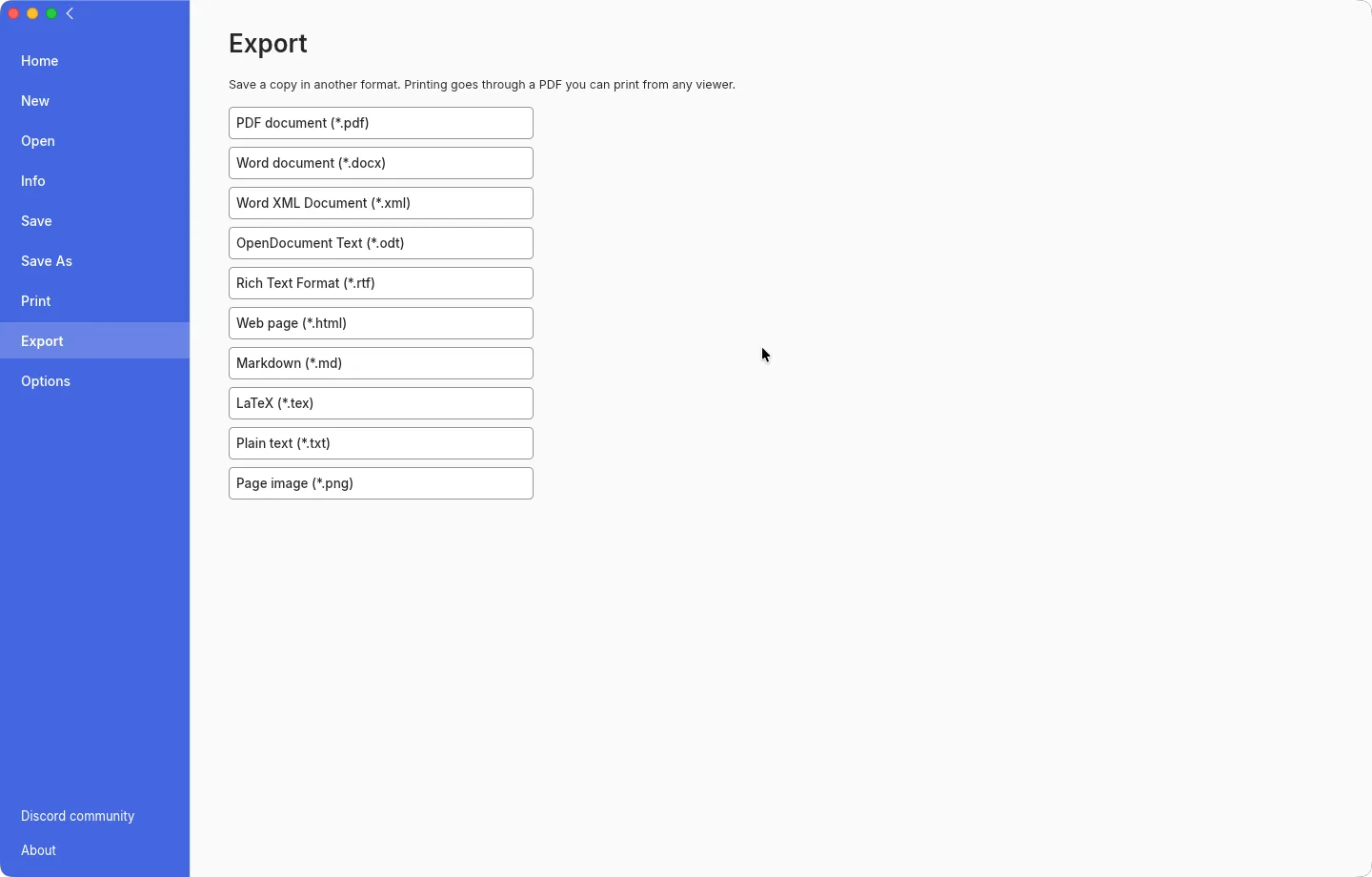
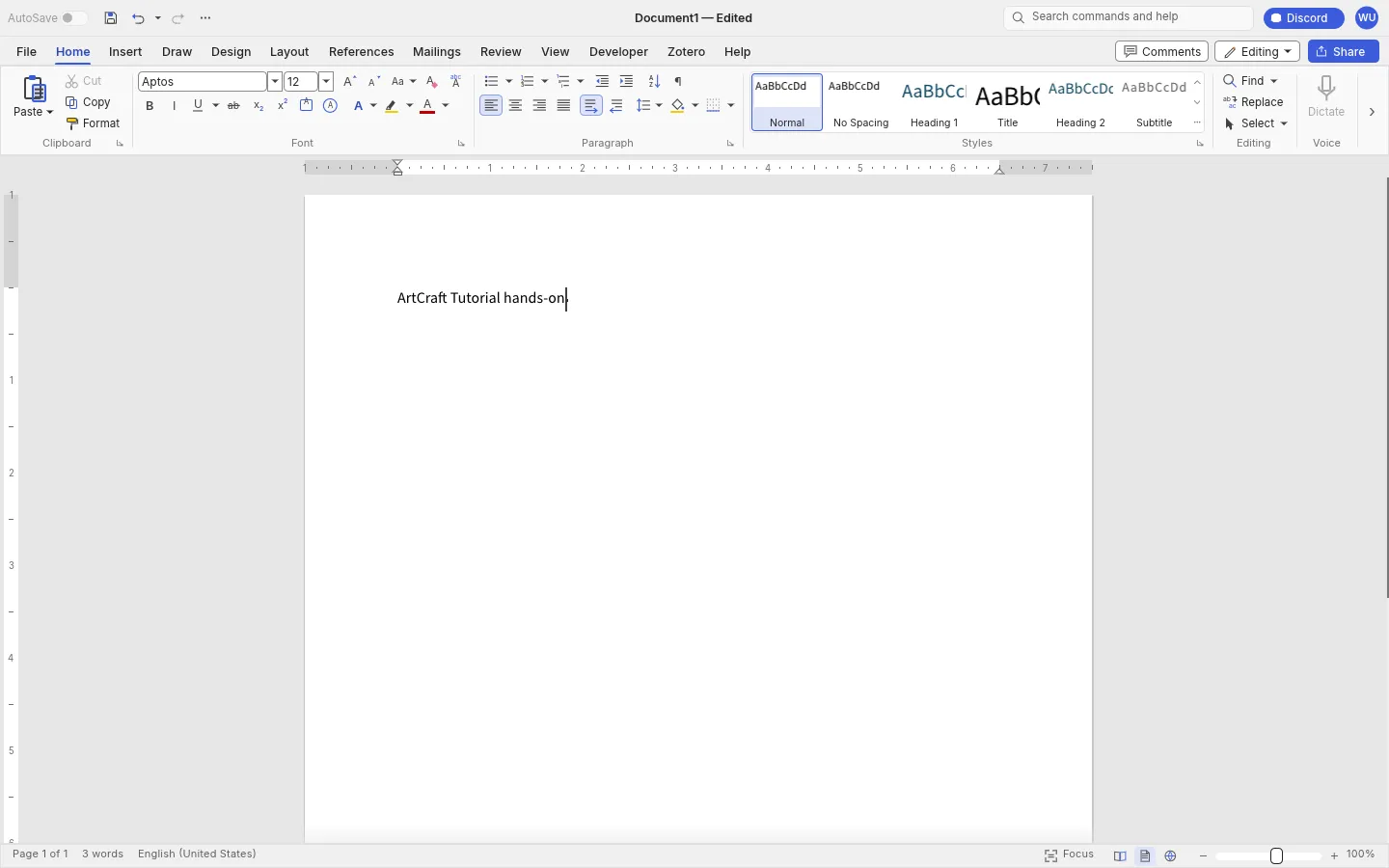
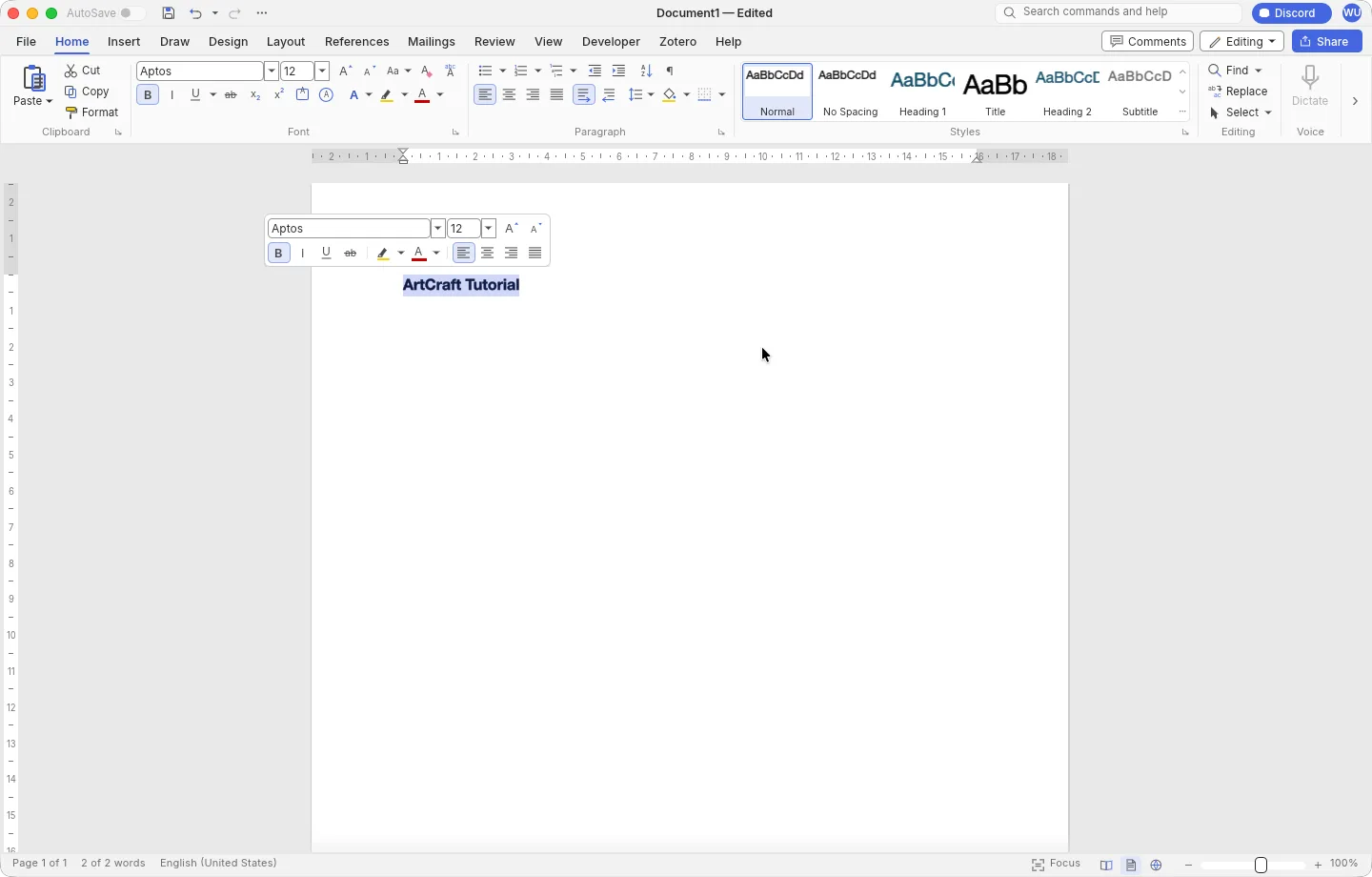
WordCraft for Mac 0.6.1 with the Home tab open and a bolded line of text in the document WordCraft for Mac 0.6.1 Export page listing PDF, docx, ODT, RTF, HTML, Markdown, LaTeX, text and PNG targets WordCraft browser build with the words ArtCraft Tutorial hands-on typed in a blank document 1
Screenshots by ArtCraft Tutorial · WordCraft 0.6.1 · macOS (1, 2) and web (3) · Oct 14, 20261 / 3

What we tried, and what happened

In the browser build (0.6.1, Oct 14, 2026)

  • ✓Started a blank document and typed a line. The status bar read Page 1 of 1 and 3 words; the title bar read Document1 — Edited.WordCraft browser build with three words typed into a blank page
  • ✓Opened the Export page: PDF, docx, Word XML, ODT, RTF, HTML, Markdown, LaTeX, plain text and page image are all listed.
  • ◐Clicking a format in our headless Chromium run produced no file — the log says no download event. In a normal browser that click is an ordinary download, so we are not calling this a failure of the app; we simply have no exported file from the browser build.

On a Mac (0.6.1, Oct 14, 2026)

  • ✓Launched the app, typed ArtCraft Tutorial (the driver read all 17 characters back) and bolded the line with ⌘A and ⌘B.WordCraft for Mac with a bolded line of text
  • ✓File → Export → PDF document wrote a one-page A4 PDF (6.6 KB) that opened in a viewer.
  • ◐The save panel would not take a target folder, so our PDF landed in the app's default folder; we haven't finished desktop save/export tests for the other formats.

Screenshots by ArtCraft Tutorial · WordCraft 0.6.1 · Oct 14, 2026

What ArtCraft says it can do

From the WordCraft README — these are ArtCraft's claims, not our test results:

  • Familiar. “Word's ribbon tabs, groups, shortcuts and behaviour”: Enter continues a list, Ctrl/⌘+B bolds the word under the caret, F7 checks spelling. We used the ribbon, selection and bold; the rest is untested by us.
  • Your files. It “opens and saves .docx”, also handles .odt, .rtf, .html, .md and .txt, opens Word 97-2003 .doc, and exports PDF with selectable text and links. We exported a PDF; the file formats are untested by us.
  • Fast. Typography is cached, so the README claims a 188-page document re-lays out in about 1.4 ms. We only had short documents to hand.
  • Built for agents. Every action is a command with an id, and “the same 422 commands drive the ribbon, keyboard shortcuts, the command search, a command-line tool, a JSON control channel and an MCP server”. Not tested by us yet.

If you're coming from Word

Word habits we saw
You want to…In WordIn WordCraft (as we saw it)
Write with the ribbonHome tab: Clipboard, Font, Paragraph, Styles groupsHome tab with the same four groups, same button order (screenshot 1)
Bold the selectionCtrl/⌘+BCtrl/⌘+B — we used it and the text went bold
Start writingFile → New → Blank documentFile → New → Blank document; the start page also lists Blank document, Studio handbook, Letter, Résumé and Report templates (README)
Send a PDFFile → Export → Create PDFFile → Export → PDF document; we got a one-page A4 PDF (screenshot 2)

Rows marked “README” are ArtCraft's documentation; the rest we did ourselves. Tell us at contact@artcrafttutorial.com if a row behaves differently on your machine.

How to get it

WordCraft is free and needs no account. Version 0.7.0 landed on GitHub on Oct 14, 2026 with 26 release files; these four cover almost everyone:

Your computerFileSize
Mac (Apple silicon and Intel)wordcraft-0.7.0-macos-universal.dmg100.1 MB
Windows 10/11, 64-bitwordcraft-0.7.0-windows-x64.msi75.9 MB
Linux x86-64 (AppImage)wordcraft-0.7.0-linux-x86_64.AppImage88.5 MB
Prefer the browserwordcraft-web-0.7.0.zip14.3 MB

The same release ships SHA256SUMS.txt, so you can check what you downloaded before you open it. Our download guide explains the checksum step and lists the Windows ARM, Linux ARM, Flatpak, RPM and FreeBSD files we left out of the table above.

Open the WordCraft releases on GitHub →

What we haven't tested yet

  • Templates and long documents. Templates, tables of contents, footnotes, mail merge and track changes — all listed, none of them tried.
  • .docx in both directions. This is the claim we most want to verify, and the one we have not.
  • This build on Windows and Linux. We only ran the Mac app and the browser package.

Common questions

Q1Is WordCraft free?
Yes — no price, no account, no subscription, and its spelling and grammar run on your machine.
Q2Is WordCraft open source?
Its GitHub repository is listed under the Apache-2.0 licence, and the README badge reads “MIT / Apache-2.0”. Read the repository's own LICENSE files if the exact terms matter for your use.
Q3Where is WordCraft on GitHub?
At github.com/storytold/wordcraft. Downloads come from its releases page: releases/latest.
Q4Does WordCraft run on Windows, on Linux, or in a browser?
All three, and on macOS and FreeBSD as well. Windows gets MSI installers and portable zip files for x64, ARM64 and 32-bit x86; Linux gets AppImage, deb, rpm, Flatpak and tarballs; the browser package is a WebAssembly site you host yourself rather than a service you sign into.

Related guides