X 0 · Y 0

Home / ArtCraft vs Adobe

ArtCraft vs Adobe: what each free app stands in for

ArtCraft is a family of 13 free, open-source apps, and seven of them say in their own README what they are: a clean-room rebuild of an Adobe program. The other six mirror software from other companies. All of them are early alpha, and none is made by Adobe. Here is the whole mapping, with the formats each README names and what we saw.

Versions0.6.0 – 0.11.0
StatusEarly alpha
Runs onMac, Windows, Linux, browser
PriceFree
Facts checked Oct 15, 2026X — Y —

The whole family, mapped

Adobe's Photoshop, Illustrator, Premiere Pro, Lightroom, Acrobat, After Effects and InDesign have one ArtCraft app each aimed at them. The other six go after Figma, Word, PowerPoint, Excel, AutoCAD and Pro Tools. "Mirrors" is quoted from each app's README, read on GitHub on Oct 15, 2026; the format column lists only formats those READMEs name.

13 apps, one tableOct 15, 2026
AppMirrorsFormats its README namesWhat we saw
PhotoCraft 0.9.0Adobe PhotoshopPSD, PSB, layered TIFF, SVG, OpenRaster, PNG, JPEG, WebP, OpenEXR, HDR✓ Browser: opened a PNG, duplicated a layer, exported a PNG. Mac: saved a PSD and reopened it with both layers.
VectorCraft 0.11.0Adobe IllustratorIts own .vectorcraft, SVG, PDF, PDF-compatible .ai, PNG, EPS, DXF✓ Browser: new document, rectangle, text, exported a PNG (612×792).
FilmCraft 0.8.0Adobe Premiere ProOwn H.264, HEVC, ProRes, AAC; FCP7 XML, AAF, OTIO. .prproj is not readable✓ Browser: played the bundled demo project. Mac: interface switched to English.
LightCraft 0.8.0Adobe LightroomOwn RAW decoders (DNG, CR2/CR3, ARW, NEF, RAF), PSD composites, JPEG XL◐ Browser: the library opened; our PNG did not reach the catalog.
PdfCraft 0.8.0Adobe AcrobatPDF, behaviour from the ISO 32000 spec; forms, signatures, comments. No Office-to-PDF yet✓ Browser: opened a two-page PDF and saved a reduced copy. Mac: opened it too.
EffectCraft 0.10.0Adobe After EffectsIts own .ecproj, H.264 MP4 out. .aep cannot be opened, plug-ins do not run✓ Browser: played the bundled composition. Mac: built one and typed on the canvas.
DesignCraft 0.8.0Adobe InDesignIDML in and out, editable PowerPoint export, PNG, PDF (PDF/X-4)✓ Browser: Letter document, text, PNG export (1224×1584). Mac: same path.
FigCraft 0.6.0FigmaExport to PNG, JPG, WebP, SVG, PDF; .fig opens best effort◐ Browser: drew a rectangle and text; the export click made no file.
WordCraft 0.7.0Microsoft WordReads and writes .docx, exports PDF, imports .doc, ODT, RTF, HTML, LaTeX◐ Browser: typing worked, no file landed. Mac: exported a PDF.
SoundCraft 0.7.0Avid Pro ToolsWAV/BWF/RF64, AIFF, FLAC, MIDI files, MusicXML. AAF/OMF session exchange missing✓ Browser: played the demo song. Mac: transport ran, WAV import out of reach.
DeckCraft 0.7.0Microsoft PowerPointOpens and saves .pptx, PDF export, full-screen presenting◐ Browser: typed on a slide, saved a .deckcraft file, no image export.
CADCraft 0.7.0Autodesk AutoCADDXF read and write, DWG through an open-source library, PDF, SVG✓ Browser: typed LINE and drew. Mac: drew a circle.
GridCraft 0.7.0Microsoft ExcelXLSX native (formulas, tables, charts), CSV, TSV, .xls input◐ Browser: typed 42 into A1; the headless browser cancelled the save.

Two things we will not dress up. Native project files mostly do not carry over: PSD is the exception the PhotoCraft README is proud of, while .prproj, .aep and .indd are listed as unreadable — those apps ask you to bring work across as FCP7 XML, a flattened file or IDML. And the versions above are the newest releases on GitHub, one step ahead of what we tested.

PhotoCraft vs Photoshop

This is the comparison people search for, and the one ArtCraft has pushed furthest. The PhotoCraft README calls itself "an open-source, clean-room reimplementation of Adobe Photoshop, rebuilt in pure Rust", and says plainly that it is not yet a Photoshop replacement for daily professional work, naming generative features, missing tools and plug-ins as the gaps.

The claim that matters if you have old project files is PSD. The README says re-saving keeps the render of 307 of the 309 psd-tools test files; the ArtCraft PhotoCraft page still carries the older, bolder figure of 134 of 135 real-world files round-tripping unchanged. Testing either properly means opening dozens of files we did not author, and we have not done that.

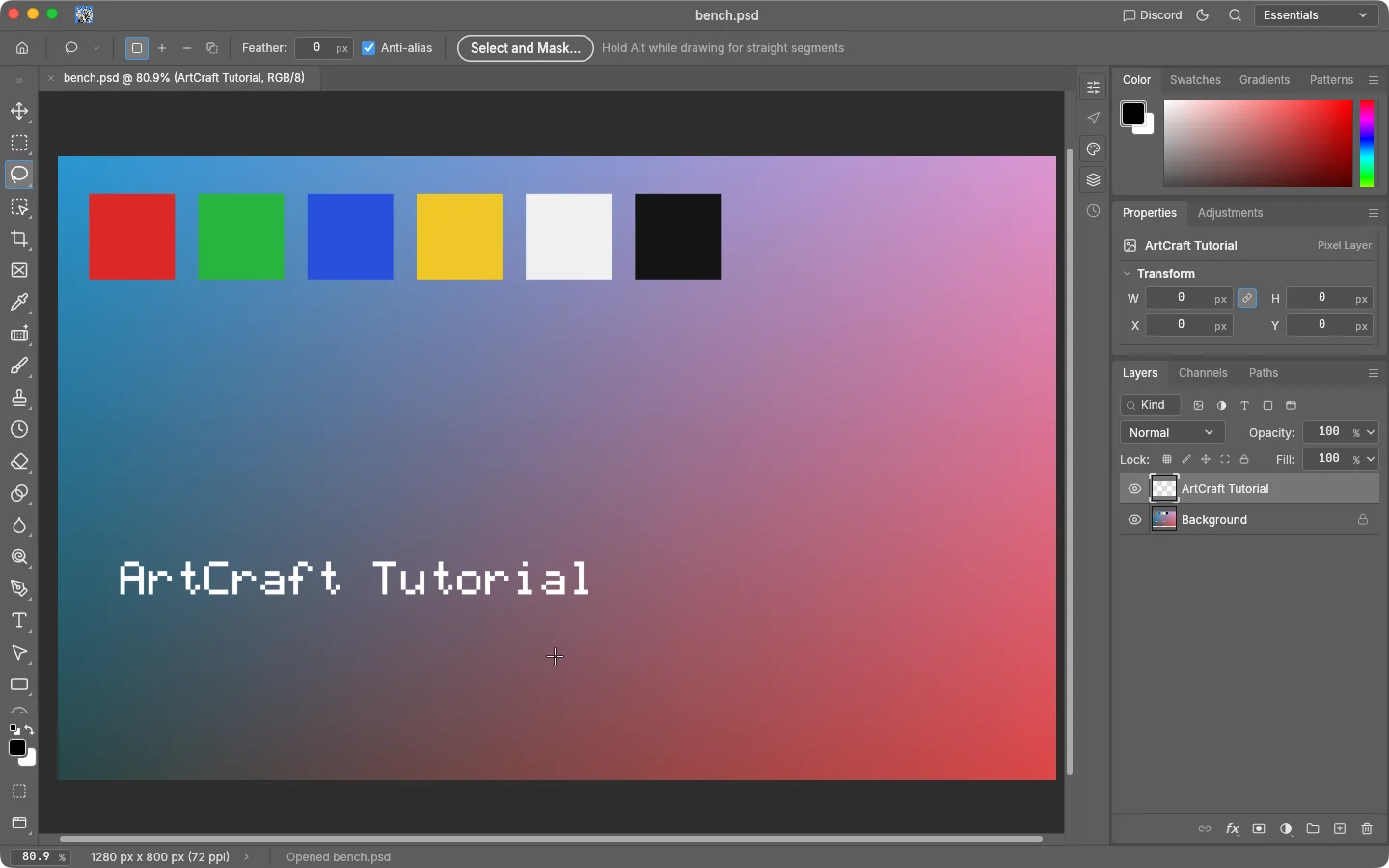
We did run the round trip on a Mac on Oct 15, 2026: added a second layer to a test image, saved it as bench.psd, closed the document, reopened the file. The file identified itself as Adobe Photoshop Image, 1280 x 800, RGB, 3x 8-bit channels, and both layers came back.

PhotoCraft 0.8.2 on macOS with bench.psd reopened: the Layers panel lists ArtCraft Tutorial above Background and the status bar reads Opened bench.psd
Screenshot by ArtCraft Tutorial · PhotoCraft 0.8.2 · macOS · Oct 15, 2026

That round trip ran on PhotoCraft 0.8.2; the newest release is 0.9.0, published Oct 14, 2026, after our test.

Habits carry over because the layout does. Each row is something we did in one of the two apps:

Photoshop habits, PhotoCraft answers
You want to…In PhotoshopIn PhotoCraft (as we used it)
Work in layersLayers panelLayers panel with Channels and Paths tabs
Add a layer by handLayer › New › LayerSame menu; the name box comes up pre-selected
Adjust without damaging pixelsLayer › New Adjustment LayerSame path; we used Levels with its live histogram
Hand a file to a Photoshop userFile › Save As › PSDSave As .psd; the file reports itself as a Photoshop image
Get a quick PNG outFile › Export › Quick ExportQuick Export, in the browser build and on the Mac

Limits to know before you switch

  • Everything here is an early alpha. Keep the Adobe app for client work; the READMEs say the same.
  • The ArtCraft website lags GitHub. Its PhotoCraft page still lists 0.7.0 against a 0.9.0 release.
  • Adobe fonts, plug-ins and actions are untested by us, and plug-in compatibility is not there.

Numbers on this page come from three places: each app's README in the storytold organisation on GitHub, its latest release entry there, and our own dated test notes.

What you give up, what you gain

You gain the bill. The Craft apps are free and open source with no account and no subscription — CADCraft's README says "free… with no account and no subscription", LightCraft's adds "No account, no cloud, no telemetry". Adobe sells subscriptions, and we are not quoting a price: we have not read Adobe's pricing pages today, and a stale price is worse than none.

You give up maturity. ArtCraft publishes its own honesty numbers: FilmCraft about 56% of the way to replacing Premiere for real work, VectorCraft about 65% ready for a mainstream illustrator, LightCraft about 61%, EffectCraft about 45%. Those are the project's estimates, not ours; we verified only the actions in the table.

Common questions

Q1Is ArtCraft made by Adobe?
No — they are unrelated. ArtCraft is an independent open-source project. Adobe, Photoshop, Illustrator, Premiere Pro, Lightroom, Acrobat, After Effects and InDesign are trademarks of Adobe, used here only to identify the products, and the same goes for Figma, Word, PowerPoint, Excel, AutoCAD and Pro Tools.
Q2Can PhotoCraft open PSD files?
ArtCraft says yes, layered PSD and PSB included, and quotes a 307-of-309 figure from its own corpus. We saved a PSD on a Mac and reopened it with both layers, which tests the writing side. We have not opened a Photoshop-authored file, so treat "your old PSDs open" as their claim for now.
Q3Is there a free alternative to Illustrator or Premiere in ArtCraft?
VectorCraft is the Illustrator-shaped app (0.11.0) and FilmCraft the Premiere-shaped one (0.8.0); both are alpha. We drew a rectangle and typed text in VectorCraft, and played a demo project in FilmCraft. That is not the same as finishing real work in either.
Q4Do these apps open Adobe project files?
Only as far as each README says: PhotoCraft reads and writes PSD and PSB, DesignCraft takes IDML, FilmCraft cannot open .prproj and takes FCP7 XML or AAF, and EffectCraft cannot open .aep.
Q5Has Adobe responded to ArtCraft?
Not that we can find. As of Oct 15, 2026 we have not seen a public statement from Adobe about ArtCraft or its apps. What you may have read about Adobe and ArtCraft comes from news coverage and forum threads, not from Adobe itself.

Related guides