ArtCraft vs Photoshop: where PhotoCraft stands today
Not for daily professional work yet — PhotoCraft's own team says so. It is free and open source, opens layered PSD files, and keeps Photoshop's menus and shortcuts; Photoshop costs US$22.99 a month on an annual plan.
Facts checked Oct 17, 2026X — Y —
PhotoCraft and Photoshop, side by side
Photoshop cells are two Adobe pages saved Oct 17, 2026. PhotoCraft cells are the README and the parity note. If a page is silent, the cell says so.
PhotoCraft vs PhotoshopOct 17, 2026
Photoshop
PhotoCraft
Price
US$22.99/mo. Annual, billed monthly.
README: the Crafting Apps are free and open source. No price is listed.
License and source
Not on the two Adobe pages we saved.
MIT OR Apache-2.0. "An open-source, clean-room reimplementation of Adobe Photoshop, rebuilt in pure Rust."
Platforms
Plans page: desktop, web, and mobile. Version 27.x, updated Sep 9, 2026: Windows 11 v24H2 and v23H2, Windows 10 v22H2 and v21H2 LTSC; macOS v26, v15.x, v14.x; 8 GB RAM, 10 GB disk. Linux is not listed.
Windows, macOS, Linux, FreeBSD, and a web build.
Activation
"Internet connection and registration are necessary for required software activation, validation of subscriptions, and access to online services."
"Open source, offline, and yours." No activation step is described.
PSD
Not on the two Adobe pages we saved.
Open, edit and save layered PSD. Re-saving keeps the render of 307 of 309 psd-tools files, and 169 of 170 in a mixed set. PSB, 16- and 32-bit, CMYK and Lab open natively. A re-save is not byte-identical.
Generative AI
250 monthly generative credits. Generative Fill is listed as a standard creative AI feature, used with those credits.
README Status: AI/generative is one of the biggest gaps. The Oct 10, 2026 note for 0.6.0 scores that area 10%.
Plug-ins
Not on the two Adobe pages we saved.
README Status: plug-in compatibility is one of the biggest gaps.
Stage
Not on the two Adobe pages we saved.
README: early alpha, "not yet a Photoshop replacement for daily professional work." The Oct 10 note for 0.6.0 says stage alpha.
Prices are from Adobe's US plans page on Oct 17, 2026, annual billed monthly. That page also lists a Photography plan, with Photoshop and Lightroom, at US$19.99/mo on the same terms. Other Adobe plans are not quoted here.
How far along PhotoCraft is, by its own count
This is the PhotoCraft team's own estimate, dated Oct 10, 2026, for PhotoCraft 0.6.0. It is not our test. The newest release as of Oct 17, 2026 is 0.9.0, published Oct 14, 2026. Area rows below are from the same note: the percent is ready-for-real-work, and the third column quotes their note.
Team estimate, not our test0.6.0 · Oct 10, 2026
What they measured
Their figure
Feature breadth
~76%
Ready for real work
~45% (range 40–50%)
Mainstream practitioner
~43%
Essentials user
~61%
Stage
alpha
Areas that decide a switch0.6.0 · Oct 10, 2026
Area
%
Their note
AI / generative
10%
No ML runtime; classical substitutes only.
Type
40%
"Engine works; no type on a path, manual kerning, RTL paragraphs, OpenType panel UI, live Warp Text preview."
Layers, masks, styles
65%
"Broad and GPU-accelerated."
Adjustments and filters
70%
"All present." No Neural Filters. Filter Gallery "looks approximate."
Selections
55%
Select and Mask "is a dialog … not a workspace." Select Subject/Sky are "classical."
What we tested on our Mac
PhotoCraft 0.8.2 on our Mac. Oct 15: our own image. Oct 17: three Photoshop-saved psd-tools samples, plus a mode switch. A half-mark is only that file.
Mac notes, 0.8.2Oct 15 and Oct 17
When
What we did
Result
Oct 15
Added a layer, saved bench.psd, closed it, opened it again.
✓ Both layers came back.
Oct 17
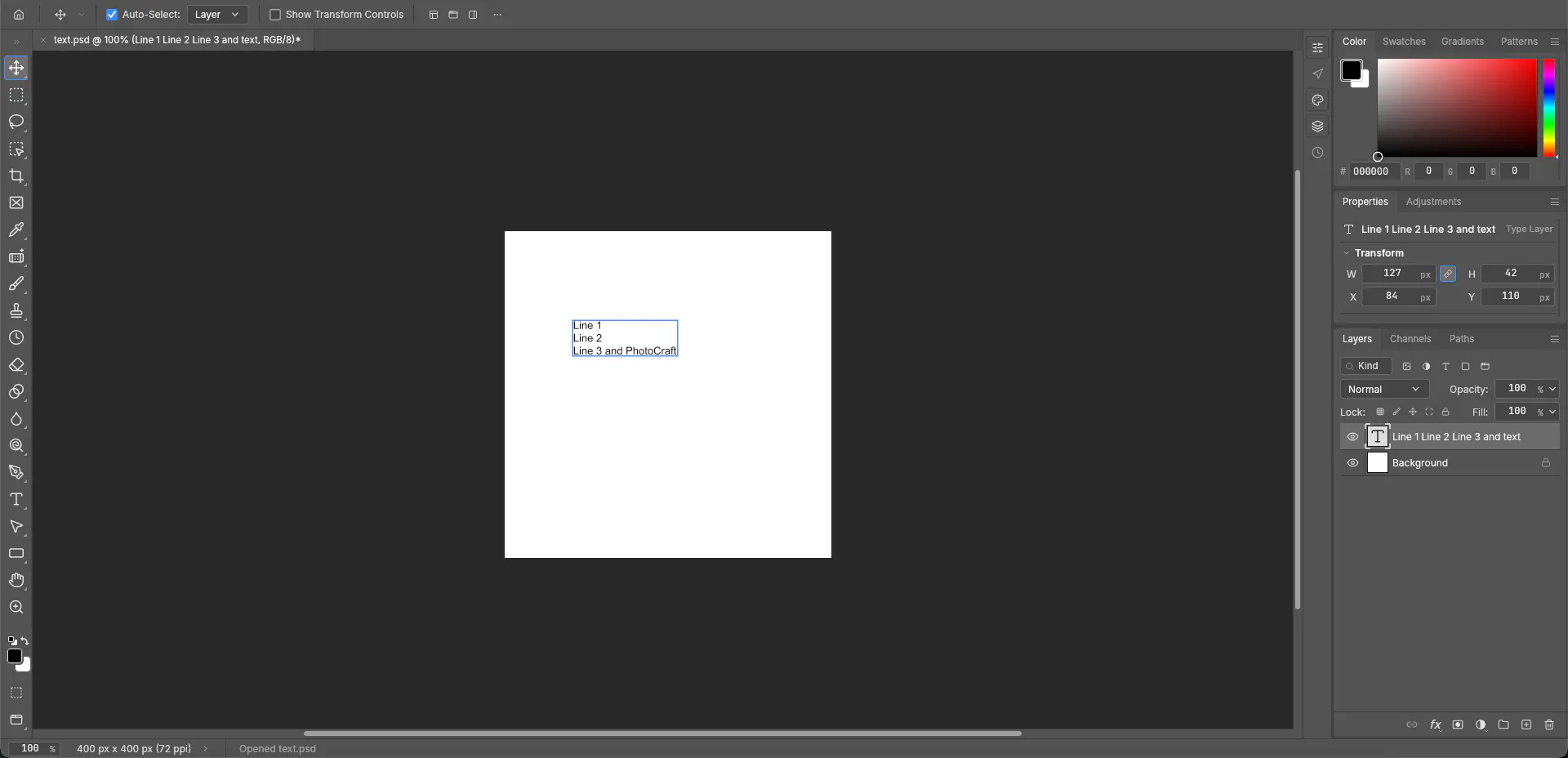
Opened text.psd (Photoshop CS5) and changed one word. Did not save.
✓ Properties still said Type Layer.
Oct 17
Opened adjustment-fillers.psd (Photoshop CC 2017).
◐ Color Fill 1 came up as a Shape Layer. Note below.
Oct 17
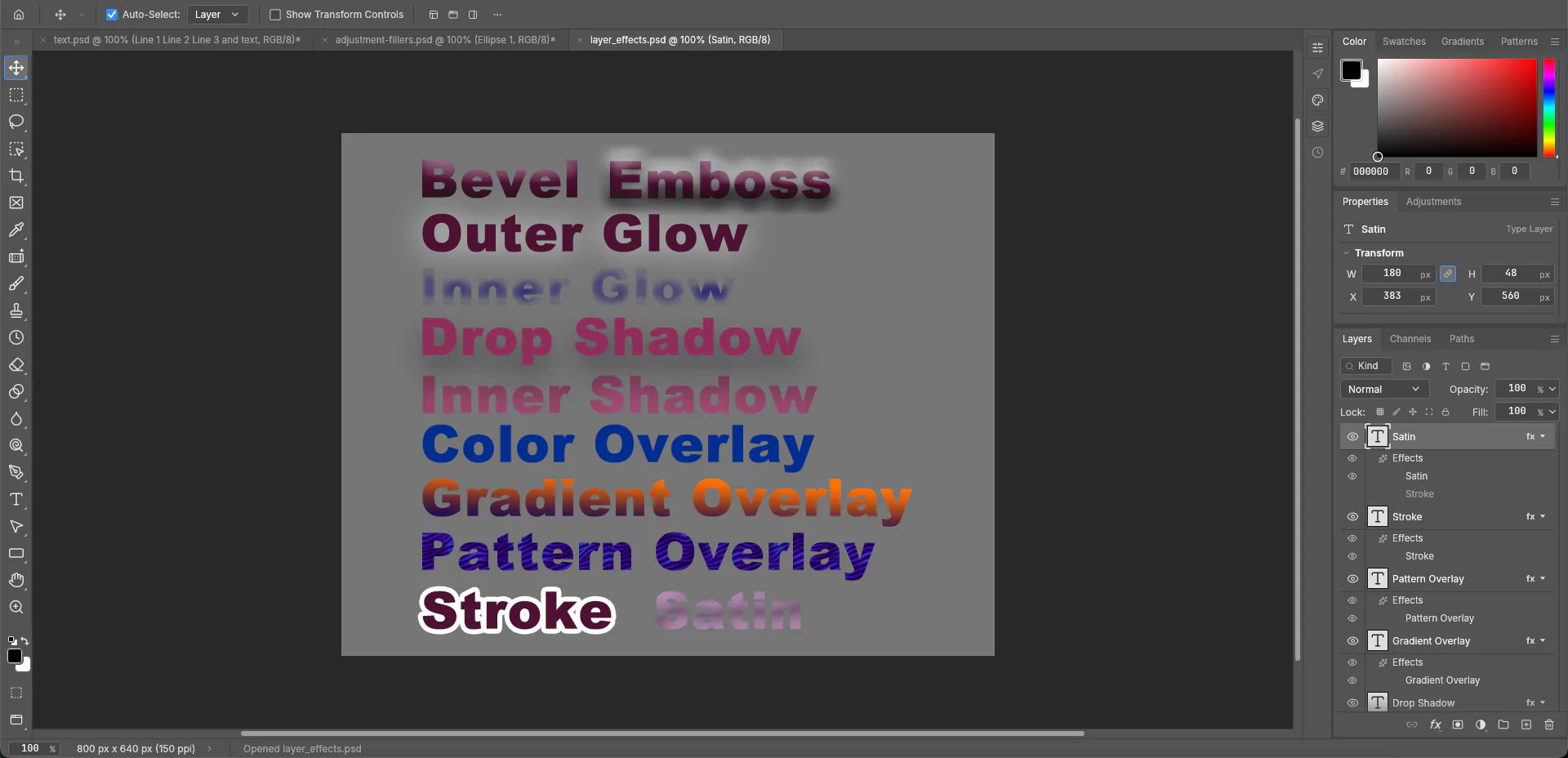
Opened layer_effects.psd (Photoshop CC 2017).
✓ fx styles were still on the canvas.
Oct 17
Select › Subject on our color-block image.
◐ Nothing selected. Note below.
Oct 17
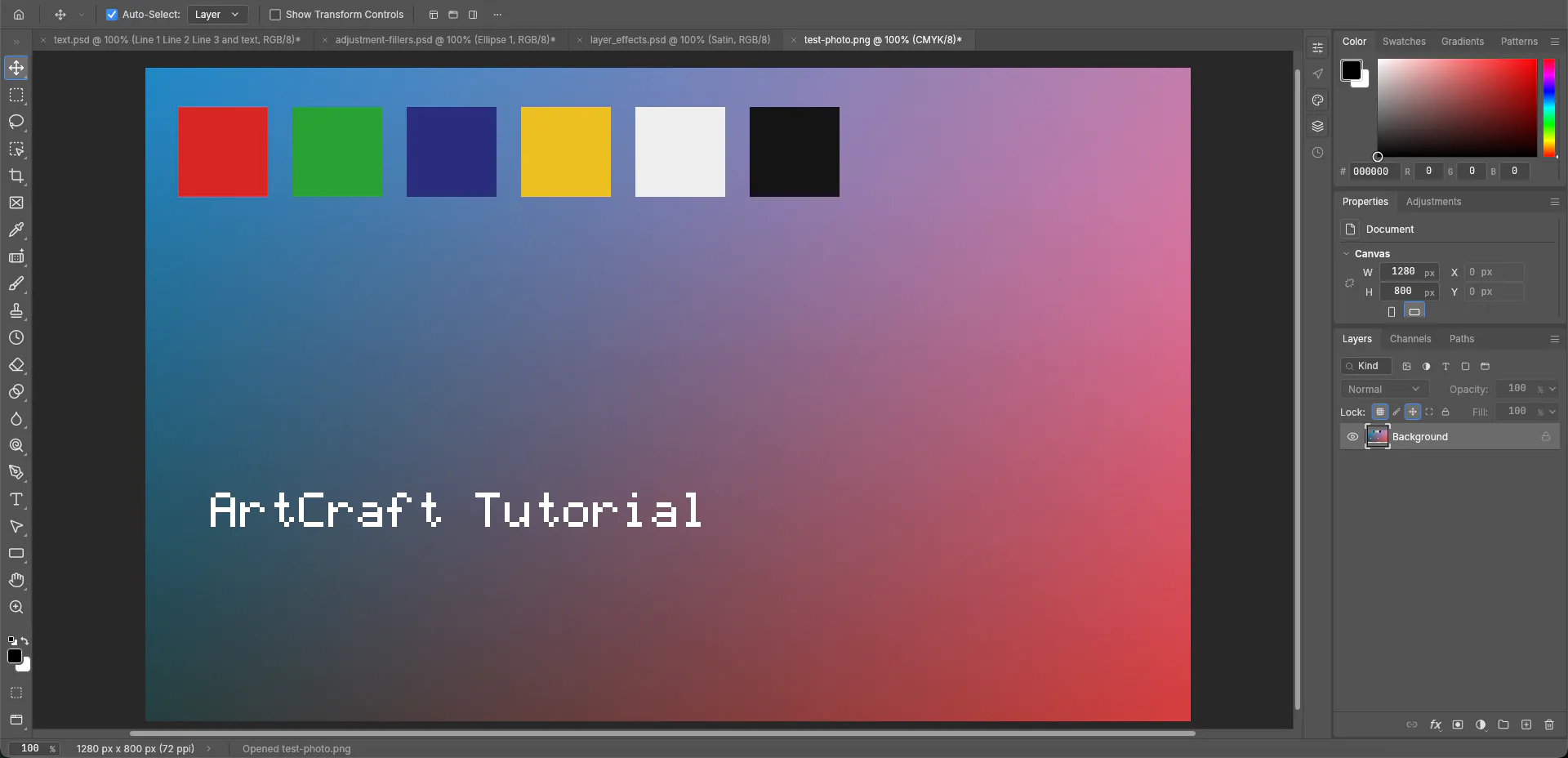
Image › Mode › CMYK Color. Did not save.
✓ The tab read CMYK/8.
The half-marks, in the same words as on our PhotoCraft page. Opened adjustment-fillers.psd, saved by Photoshop CC 2017. The Layers panel lists TEXT, Ellipse 1, Polygon 2, Polygon 1, Color Fill 1 and Background. Properties calls Color Fill 1 a Shape Layer. No editable adjustment layer, such as Curves or Levels, is visible there. On Oct 14 we added our own Levels layer in PhotoCraft, so this is only this sample.
Select › Subject is in the menu. On our test image of color blocks plus the words ArtCraft Tutorial, running it left no marching ants, no mask and no new layer. That picture has no obvious subject, so a photo of a clear subject could turn out differently.
On CMYK we did not try ICC profiles, soft proofing, 16-bit, 32-bit or Lab. We have not rerun this list on 0.9.0.
Screenshot by ArtCraft Tutorial · PhotoCraft 0.8.2 · Mac · Oct 17, 2026Screenshot by ArtCraft Tutorial · PhotoCraft 0.8.2 · Mac · Oct 17, 2026Screenshot by ArtCraft Tutorial · PhotoCraft 0.8.2 · Mac · Oct 17, 2026
README Status names four gaps: AI/generative features, 15 missing tools, depth in typography and pro workflows, and plug-in compatibility. It says PhotoCraft is not yet a Photoshop replacement for daily professional work. Wired menu items, it adds, measure wiring, not behaviour.
For 0.6.0 on Oct 10, 2026, AI / generative is 10% (no ML runtime, classical substitutes only). The same note's feature-breadth table lists no Generative Fill or Expand, Neural Filters, Sky Replacement or Super Zoom. We did not run that check on 0.8.2 or 0.9.0.
On the plans page, the US$22.99/mo plan lists 250 monthly generative credits and Generative Fill used with those credits. We are not adding Photoshop features those pages do not list.
Who should try PhotoCraft now
Our take. Try it for a free, offline edit, or to open a PSD and look. Basis: the README says the Crafting Apps are free and open source, and "Open source, offline, and yours." The Mac rows above are 0.8.2.
Do not switch yet if you need generative AI, plug-ins, or a precise print workflow. Basis: README Status, plus AI / generative 10% and Type 40% on the Oct 10 note. Our CMYK check only showed a CMYK/8 tab, not a print proof.
Moving from Photoshop: what carries over
The README says: "The menus, shortcuts, panels and tools are where your hands expect them, from ⌘J to ⇧⌘D. If you know Photoshop, you already know PhotoCraft."
PSD numbers are in the first table: 307 of 309, 169 of 170, PSB and the deep color modes, and a re-save is not byte-identical. Ours were bench.psd (Oct 15) and the three samples (Oct 17), on 0.8.2.
Our suggestion: copy the original PSD before PhotoCraft saves over it. We have not opened a PhotoCraft re-save in Photoshop.
The current installer is 0.9.0 as of Oct 17, 2026. The file list is in the download guide. We tested 0.8.2, an older build.
Common questions
Q1Is PhotoCraft a Photoshop clone?
The README's line is "an open-source, clean-room reimplementation of Adobe Photoshop, rebuilt in pure Rust." Clean-room, in their words: "implemented from public specs and observed behaviour only. No proprietary code, shaders or assets." That is their description, not a legal finding. Adobe and Photoshop are trademarks of Adobe, used here only to name the product.
Q2Is PhotoCraft free?
The README badge says MIT OR Apache-2.0. The Crafting Apps section calls them free, open-source creative tools. We are not giving a legal reading of the license.
Q3Can PhotoCraft open PSD files?
The README says yes: 307 of 309 and 169 of 170 keep their render, and PSB plus the deep color modes open. On our Mac, 0.8.2 reopened bench.psd with both layers (Oct 15). On Oct 17, text stayed a Type Layer, layer effects stayed on the canvas, and Color Fill 1 showed as a Shape Layer with no editable adjustment layer visible. That last result is only that sample.
Q4Does PhotoCraft have Generative Fill?
README Status names AI/generative features as one of the biggest gaps. The Oct 10, 2026 estimate for 0.6.0 scores that area 10% and says there is no ML runtime, only classical substitutes. Another line in that file says there is no Generative Fill or Generative Expand. Photoshop's US$22.99/mo plan, on the page saved Oct 17, 2026, lists Generative Fill as a standard creative AI feature used with 250 monthly generative credits.
Q5Does PhotoCraft run on Linux?
The README lists Linux installers (AppImage, deb, rpm, tarball, Flatpak), plus Windows, macOS, FreeBSD and a web build. Adobe's desktop requirements, updated Sep 9, 2026, list macOS and Windows and do not list Linux. We have only tested PhotoCraft on a Mac.